
Our Complete Guide To WordPress SEO
WordPress powers somewhere in the region of 40% of the entire internet, and yet the number of WordPress websites sitting in complete obscurity, buried beneath page after page of search results, is gen...
WordPress powers somewhere in the region of 40% of the entire internet, and yet the number of WordPress websites sitting in complete obscurity, buried beneath page after page of search results, is genuinely staggering. Building a WordPress site is the easy part. Getting it to perform well in Google and other search engines is where many website owners find themselves lost, frustrated, or simply unsure of where to begin. This complete guide to WordPress SEO is designed to change that, giving you a clear, practical, and thorough understanding of what you need to do, why it matters, and how to go about doing it properly.
SEO is not a one-time task you complete and forget about. It is an ongoing discipline that touches everything from the way your content is written through to the technical foundations your website sits on. WordPress, to its credit, is one of the most SEO-friendly content management systems available, but only if you know how to configure and use it correctly. Out of the box, it leaves a great deal on the table.
Start With The Right SEO Plugin
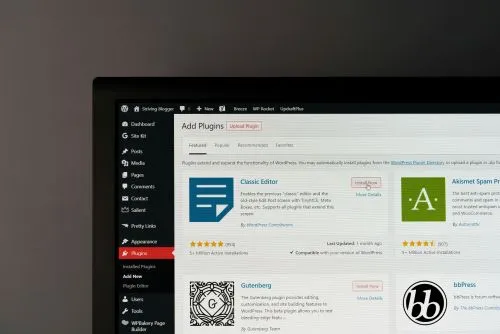
Before anything else, you need a reliable SEO plugin installed on your WordPress site. Two of the most widely used and respected options are Yoast SEO and Rank Math. Both give you control over your meta titles, meta descriptions, canonical tags, XML sitemaps, and a host of other settings that are otherwise inaccessible without touching code.
Without one of these plugins, you are essentially flying blind. WordPress does not natively give you an easy way to edit your page titles independently from your headings, or to craft custom meta descriptions for each piece of content. An SEO plugin bridges that gap and brings a level of control that is absolutely essential for anyone serious about ranking well.
Take the time to configure your chosen plugin properly once it is installed. Connect it to your Google Search Console account, submit your XML sitemap, and make sure your homepage title and description are set up to reflect what your business or website is actually about.
Get Your Permalink Structure Right
One of the most important and often overlooked settings in WordPress is the permalink structure. By default, WordPress can assign URLs that look something like yoursite.com/?p=123, which tells search engines and users absolutely nothing about the content of the page. This needs to be changed.
Head into Settings and then Permalinks within your WordPress dashboard, and select the Post Name option. This gives you clean, readable URLs such as yoursite.com/wordpress-seo-guide, which are far more useful to both Google and the people clicking through from search results. Clear URLs that reflect the content of a page contribute positively to how that page is understood and indexed.
If your site has been live for some time and you are considering changing the permalink structure, proceed carefully and ensure proper 301 redirects are in place for any URLs that change. Redirects can be managed through plugins such as Redirection, which is free and straightforward to use.
Focus On Your Content Strategy
There is no version of WordPress SEO that works without high-quality, well-structured content. Google's entire purpose is to connect users with the most relevant and helpful content available, and if your pages are thin, vague, or poorly written, no amount of technical optimisation will save them in the long run.
Think carefully about the topics your target audience is searching for and create content that genuinely answers those questions in depth. This is not about stuffing a keyword into a page as many times as possible. It is about demonstrating real knowledge and providing genuine value. Every page and every post on your WordPress site should have a clear purpose and a defined primary keyword that it is targeting.
Want more insights like this?
Join thousands of marketers getting weekly tips and strategies.
Use your primary keyword naturally within your page title, your first paragraph, at least one subheading, and throughout the body of the content where it reads naturally. Supporting that with related and semantic terms helps Google build a fuller picture of what your content covers, which can improve its chances of ranking for a wider range of relevant searches.
Optimise Your Images Properly
Images are one of the most consistently neglected areas of WordPress SEO. Every image you upload to your site should have a descriptive file name before it is uploaded, and every image placed on a page should have a meaningful alt text attribute. Alt text serves two purposes: it helps visually impaired users understand what an image shows, and it gives search engines additional context about the content of your page.
Beyond alt text, image file size is something that directly affects the speed of your website, and site speed is a confirmed ranking factor. Large, uncompressed images slow pages down considerably. Tools such as ShortPixel or Imagify integrate directly with WordPress and can compress your images automatically without any noticeable loss in visual quality.
Where possible, use modern image formats such as WebP, which offer significantly smaller file sizes than traditional JPEG or PNG files. Many of the better caching and optimisation plugins for WordPress can handle this conversion for you automatically.
Site Speed and Core Web Vitals
Google's Core Web Vitals are a set of performance metrics that measure how real users experience the speed, responsiveness, and visual stability of a webpage. They are a ranking signal, and they are something every WordPress site owner needs to take seriously.
The three primary metrics are Largest Contentful Paint, which measures loading performance; First Input Delay, which measures interactivity; and Cumulative Layout Shift, which measures visual stability. You can assess how your WordPress site performs against these metrics using Google's own PageSpeed Insights tool.
On the WordPress side, improving your Core Web Vitals typically involves choosing a well-coded, lightweight theme, installing a caching plugin such as WP Rocket, enabling a content delivery network, and minimising the number of plugins you have active. Every unnecessary plugin adds weight to your site and can contribute to slower load times.
Build A Logical Internal Linking Structure
Internal linking is one of the most powerful and underutilised tools in WordPress SEO. When you link from one page on your site to another, you are doing several valuable things simultaneously. You are helping users navigate to related content, you are signalling to Google which pages on your site are important, and you are distributing what is often referred to as link equity across your site.
Think of your website as a network of connected pages. Your most important pages, whether that is a key service page, your homepage, or a cornerstone piece of content, should receive the most internal links from other relevant pages across the site. When you publish new content, go back and link to it from existing relevant pages where it makes sense to do so.
Avoid creating what are sometimes called orphan pages, which are pages that have no internal links pointing to them. These pages are difficult for Google to discover and prioritise, and they tend to underperform as a result.
Earn Quality Backlinks
Backlinks, which are links from other websites pointing to yours, remain one of the most significant ranking factors in Google's algorithm. A WordPress site with strong, relevant backlinks from authoritative sources will almost always outperform one without them, even if the latter has technically superior on-page optimisation.
Building backlinks is not something that happens overnight, and it requires a genuine investment of time and effort. Writing genuinely useful content that others want to reference and share is the foundation of any sustainable link building strategy. Contributing to industry publications, building relationships with complementary businesses, and getting listed in relevant directories are all legitimate approaches worth pursuing.
Avoid any services or tactics that promise large numbers of backlinks quickly or cheaply. Low-quality, spammy links can actively damage your site's standing in Google's eyes, and recovering from a manual penalty is a slow and painful process.
Make Sure Your Site Is Secure
HTTPS is a baseline requirement for any modern website, and Google has made no secret of the fact that it is a ranking signal. If your WordPress site is still running on HTTP rather than HTTPS, securing an SSL certificate and making the switch should be at the top of your priority list. Most reputable hosting providers offer free SSL certificates through Let's Encrypt, and the process of switching is relatively straightforward.
Beyond SSL, keeping your WordPress installation, themes, and plugins updated is essential both for security and for performance. Outdated software is a common entry point for malicious activity, and a compromised site can disappear from search results with very little warning.
Use Schema Markup Where Relevant
Schema markup is a form of structured data that you add to your pages to help search engines understand the content in greater detail. It can lead to what are known as rich results in Google search, such as star ratings, event dates, or FAQ sections appearing directly in the search results, which can significantly improve your click-through rate.
For WordPress sites, implementing schema is made considerably easier through plugins. Rank Math includes built-in schema support for a wide range of content types, and there are dedicated plugins such as Schema and Structured Data for WP that give you granular control over exactly what markup is applied to each page type.
Monitor, Measure, and Improve
None of the work you put into WordPress SEO means very much if you are not measuring the results and using that data to inform your next steps. Google Search Console should be your first port of call for understanding how your site is performing in organic search. It shows you which queries are driving impressions and clicks, which pages are performing well, and where there may be technical issues that need addressing.
Pair Search Console with Google Analytics to get a fuller picture of how visitors are behaving once they arrive on your site. Together, these two free platforms give you an enormous amount of actionable insight that you simply cannot afford to ignore if you are serious about growing your organic presence.
WordPress SEO is a broad and evolving discipline, but the fundamentals remain consistent. Get your technical foundations right, create content that genuinely serves your audience, build your authority through quality backlinks, and commit to measuring and improving over time. These are not shortcuts or clever tricks; they are the things that actually work, and they are the things that will continue to work as search engines become increasingly sophisticated. Start with the areas where your site is weakest, work through them methodically, and the results will follow.
Ian
Ian has worked in Digital Marketing for decades, and is a Google Partner for Google Ads and an expert in onsite and technical SEO. He has worked with hundreds of clients, helping them achieve success online, through SEO, PPC and Digital Marketing, working with local businesses through to national retailers.
View all posts →Related Articles

Our Complete Guide To Improving Your Google My Business Profile
In the world of local business marketing, your Google My Business profile isn't just another online listing, it's your digital shopfront that can make or break a potential customer's first impression.

Wordpress Websites Vs AI Websites
The decision between building a traditional WordPress website or embracing the new wave of AI-powered website builders has become one of the most significant choices facing businesses today. With Word...
What Is SEO And How Does It Work?
If you've ever wondered why some websites appear at the top of Google whilst others seem to vanish into the digital wilderness, you're asking the right question.